Patent GrabberTM 6.4.2 for Mac OS X and Windows (released July 2016)
Version 6.4.2 for is a FREE upgrade for registered users of
Version 5.x and 6.x. When you start Ver. 6.4.2, it should automatically open up
in its registered state. If that does not happen, enter your username and registration code.
The Mac OS X version is now code signed for your protection. Check your settings under "Secuity & Privacy" --> "General" to make sure it is set to allow apps downloaded from "Mac App Store and identified developers." We will release a code signed Windows version of Patent Grabber as soon as we can.
Searching:
Fixed a PCT searching issue that was caused by changes at WIPO.
Thanks to Ed who reported the PCT searching issue! Also, many thanks to the numerous Patent
Grabber purchasers for their suggestions!
Patent Downloading:
Patent Grabber makes it easy to
download U.S. patents and published applications, European patents and
published applications, PCT published applications, and patent documents from many other countries
and patent-issuing organizations for free from public patent
archives:
- Download multiple patents or
applications with a single click
- Optionally download the patent or
application text (if made available by the USPTO or EPO)
- Combines the pages of each patent or published application
into a single PDF on Mac OS X (Snow Leopard or later) and Windows (2000 and
later)
- Windows requires a free helper
application (see Quick Start or full instructions for details)
- Download every page or just the
pages of selected sections (e.g., just the first page and claims)
- Optionally create a single PDF file from multiple downloaded documents
- Create
a basic spreadsheet that contains bibliographic information for
multiple U.S. patents (optional family identifier, patent number, issue
date, title, filing date, application number, inventor(s), assignee,
abstract, foreign priority, US class, international class, legal
representative, field of search, cited U.S. patents)
- Create
an enhanced
spreadsheet that additionally contains for each patent in your list: 1)
the corresponding foreign patents from INPADOC, 2) the legal status of
the patent from INPADOC, 3) full description of the main class of the
patent, 4) the assignees of the cited patents, 5) the count of cited
patents, 6) a list of later-issued patents that cite the patent
("forward citations"), 7) the count of forward citations (in case you
are interested in that statistic) and 8) the assignees of the forward
citations
- Download the INPADOC international
legal status information for any number of patents or applications with
a single click (example)
- Mac OS X can print muliple
selected patents and applications with a single click
- Create a Claim Report or an Abstract Report
from any list of patents. This function was previously only available
for using with search results. Now you can use those features with your
own list of patents.
U.S., EP-A, PCT and International Searching:
Three search interfaces:
- Quick
- allows more search terms than the USPTO's "Quick" search (which
allows only two), and is more robust (allows multiple AND and OR
connectors)
- Advanced
- (not available for International) the search aids (see below) make it easy to construct a complex
search (not available for EP-A searching)
- Issuance
or Publication - (not available for International) makes it easy
to search for multiple classes, companies or other search terms in
patents or published applications that were issued or published on a
date or within a date range (not available for EP-A searching)
Helpful search aids:
- Choose search field codes from a
dropdown list. The list automatically adjusts depending upon whether
you choose a U.S. patent, U.S. publication, EPO or PCT publication
search.
- Custom "Date Interface" guides you
through the process of entering dates and date ranges in the proper
USPTO, EPO or WIPO format
- Dropdown list of countries assists
finding the correct two-letter code when you choose a search field that
requires the entry of a Country Code
Each individual search result can be
viewed in three ways:
- Full text (availability for International varies based upon the content of the EPO library)
- Abstract and bibliographic
information (faster than full text)
- INPADOC Patent Family (patents and applications in the U.S. and many
other countries that are in some way related to a patent or application)
Each can be saved or printed. The saved list of patent family information
will be in tab-delimited format for easy importation into a spreadsheet
or word processing table.
Save all of your search results in any of four different ways:
- Titles: a tab-delimited
list of the patent/application numbers and the titles that can be
opened by a spreadsheet program (e.g., MS Excel)
- Sortable List: (not available for International) a
tab-delimited list of bibliographic information that can be opened by a
spreadsheet program. This makes it easy to sort by assignee, inventor,
or International Patent Classification
- Abstract Report: (not available for International) an HTML
file that can be opened by a web browser or MS Word that contains the
abstract of each patent/application along with bibliographic information
- Claim Report: (not available for International) a text file
that contains the patent/application number, issue/publication date,
title, assignee, and all of the claims of each patent or application
Requirements, Licenses and
Download Links:
Patent Grabber 6.4.2 for Mac
requires an Intel Mac (runs
natively as a "universal binary" application). OS X Snow Leopard (OS 10.6.6) or later is required.
Patent
Grabber 6.4.2 for Windows requires a PC running Windows 7 or
later, plus the free PDFTK.exe helper application.
Patent Grabber is initially in a
free Evaluation Mode (limited to downloading one patent at a time, creating an regular spreadsheet of up to 10 patents,
or downloading a single INPADOC legal status summary).
License Fees:
Patent
Grabber 6.4.2: $30 ($10 to upgrade from Versions 1 through 4;
free upgrade from any later version)
Licenses may be purchased online through Avangate.
Download Patent Grabber 6.4.2
for Windows
or Mac OS X
Family-izerTM
2.5 (released March 2010)
Family-izer
now works without the need for a browser plugin!
What's
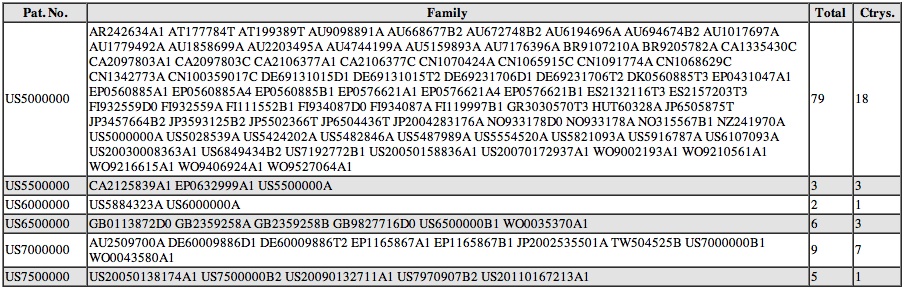
New with Ver. 2.5: added two columns of statistical information.
The first column shows the number of patents in the family. The second
column shows the number of unique countries and/or regions in the
family.
Family-izer
is a free web-based application to retrieve patent family information
for patents and published applications. It utilizes the European Patent
Office's INPADOC database. Just go to the Family-izer
page to use it. However, if you do not want to do that right now,
here is a snapshot of what the results will look like:
Please see the Family-izer page for more
information.
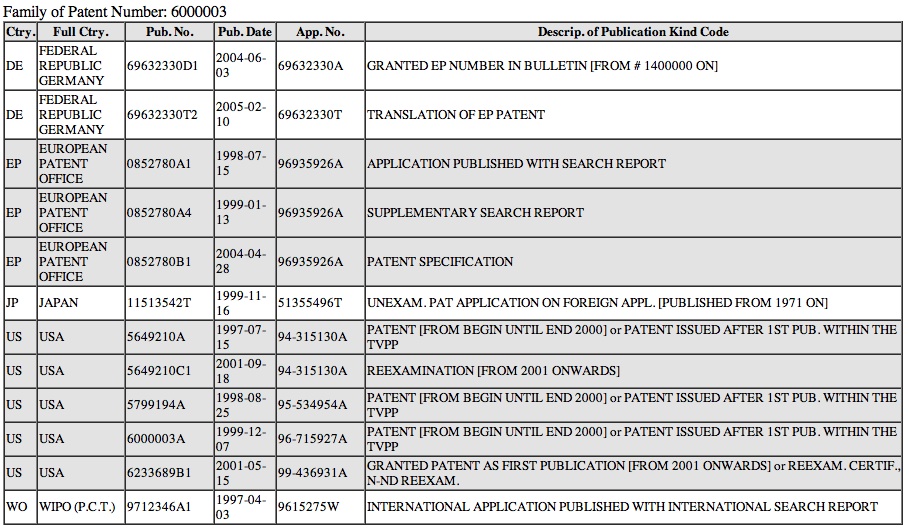
Family-izerTM Solo (released
August 2011)
Family-izer Solo provides more
information about a single patent.
That information includes the full country name, publication date,
application number, and the explanation of each Kind Code. Here is an
example:
Forward Citation Generator 1.3 (released June 2013)
What's New:
Ver. 1.3 adds a new function called "Unique Forward Cites." Instead of
creating an entire forward citation tree, the Unique Forward Cites
function lists only the unique patents that would be found in a full
tree. It also lists the number of times each patent would appear in the
full tree, the first generation in which the patent would appear in the
full tree (for ease of sorting and filtering in a spreadsheet), and all
of the generations in which the patent would appear in a full tree.
Also, the default number of generations is now 1 rather than "all"
since the number of direct foward citations that a target patent has
likely provides the most immediate information concerning the target.
Additionally, a bug caused by the USPTO's addition of a note about a
certificate of correction to the text of every patent that was the
subject of a certificate of correction has been fixed. That bug had
prevented Forward Citation Generator from retrieving the title of any
patent that was the subject of a certificate of correction.
The Forward Citation Generator
takes a target U.S. patent and retrieves the patent numbers of all
subsequently granted U.S. patents that cite the target patent (the
target patent's "forward citations"). Those forward citations of the
target patent are the 1st Generation forward citations. The number of
1st Generation forward citations of a target patent is considered to be a
rough measure of the importance of the invention claimed in the target
patent.
The Forward Citation Generator
can then go through an iterative process of retrieving the forward
citations for each 1st Generation forward citation to obtain the
2nd Generation forward citations, and then go through the same process to
obtain the 3rd Generation, 4th Generation, etc. forward citations until it
reaches the point where there simply are no further forward citations
(users can manually limit the number of generations, if they wish, to a
number from one to fifteen).
Once the last generation is reached, the Forward Citation Generator
will download the text of every patent that was cited and extract basic
bibliographic data (issue date, assignee, title and main
class/subclass). The main class/subclass numbers are supplemented with
the full description of that class/subclass (a text file that comes
with the Forward Citation Generator provides the descriptions).
Forward Citation Generator also provides some statistical data in addition to the forward citations. That data is:
- the total number of unique patents
in the forward citation tree. Since one patent may appear in several
different branches of a forward citation tree, it may be useful to know
how many unique patents are actually in the tree;
- the number of unique patents that are in the same main class as the target patent;
- the number of unique patents that are in the same main class/subclass as the target patent; and
- the number of branches in the entire tree.
The length of time it takes for the process to be completed varies with
the number of forward citations that the target patent has, and the
number of forward citations that the succeeding generations of forward
citations have. For example, 6,001,234 takes little more than a minute
for four generations, while 5,000,000 takes about thirty minutes for
twelve generations. Once finished, the results can be saved as a text
file that can be imported into a spreadsheet and studied, filtered and
otherwise manipulated.
Here are examples of spreadsheets for the Forward Citation Tree and Unique Forward Cites
While 1st Generation forward citations are thought of as a measure of the
importance of an invention, what is the use of the subsequent
generations? Is there anything to be learned by tracing the forward
citations of 5,000,000 ("Ethanol production by Escherichia coli strains
co-expressing Zymomonas PDC and ADH genes") to 8,088,548 ("Bottom
antireflective coating compositions") in the 12th Generation? I don't know,
and that is why I am providing the Forward Citation Generation
for free. Just provide attribution and abide by the other license
requirements and I will be happy. Of course, I will be even happier if
users let me know how they are using this application!
Requirements, Licenses and
Download Links:
Forward Citation Generator 1.3 for Mac
requires a PowerPC or Intel Mac (runs
natively as a "universal binary" application). OS X Tiger (OS 10.4.x) or later is required.
Forward Citation Generator 1.3 for Windows requires a PC running Windows 2000 or
later.
License: There is no license fee. A license screen will appear each time you start Forward Citation Generator. Simply abide by the license requirements and you are licensed.
Download Forward Citation Generator
for Windows
or Mac OS X
WINDOWS is a trademark
of Microsoft Corp., ACROBAT is a
registered trademark of Adobe Systems Incoroprated, HYPERCARD is a
registered trademark of Apple, Inc. (formerly Apple Computer, Inc.).
PATENTSCOPE is a registered trademark of the World Intellectual
Property Organization.